|
CryptoExpert 2003
| Tour |
 |
Using virtual drives like normal drives
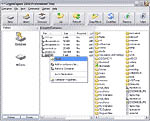
Use the CryptoExpert drive letter just as you
would any other drive. Using Explorer, you can drag and drop
files to the CryptoExpert drive letter to instantly encrypt
them.
You can even open wordprocessing documents
and spreadsheets directly while they reside on the CryptoExpert
drive. In contrast to some other products, with CryptoExpert
you do not need to manually move your files out of the encrypted
area to work with them.
 Install
Create an Encrypted Container
Map the Container to a Drive Letter
Using virtual drives like normal drives
Unmap and Unmount container when Done
|


 Report about bugs found on this
page
Report about bugs found on this
page